
Simple embeddable contributor and sponsor widgets for your GitHub README

Contents
It's nice to give credit to contributors and supporters who've helped your project 💞
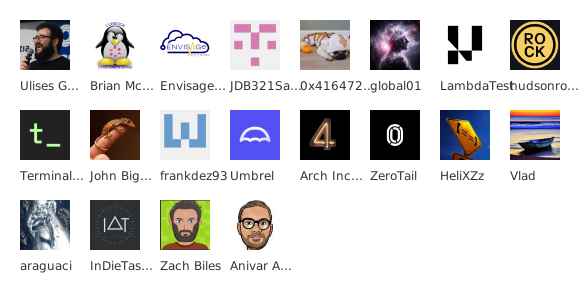
This project gives you an easy way for you to embed your projects contributors, sponsors, stargazers, watchers, forkers, followers, etc, into your readme or website. And it's highly configurable, so you can customize the look and feel. ↳ See Examples
It can be used for free at here. But is also very quick, easy and free to deploy your own instance (either with 1-click deploy to Vercel or self-host anywhere with Docker).
I use this in all my projects, because:
- Using GitHub Actions to generate this info clutters up the commit log
- Existing services don't let you configure the look and feel
- I couldn't find anywhere else which also supported sponsors, stargazers etc.
To embed the image in your markdown, simply use the endpoint as the image URL.
For example:
The following API routes are to be made from the base domain.
For the public instance, use https://readme-contribs.as93.net.
If you're hosting your own instance, update this to your domain.
/contributors/[user]/[repo]
/sponsors/[user]
/stargazers/[user]/[repo]
/forkers/[user]/[repo]
/watchers/[user]/[repo]
/followers/[user]
You can customize the outputed image, it's appearence and functionality with the following options.
Specify these as query string parameters, appended to the end of your GET request. All values are optional.
| Parameter | Description | Type | Default Value |
|---|---|---|---|
title |
The title to be displayed above the widget | String | '' (Empty string = no title) |
avatarSize |
Minimum size of avatars | Integer | 50 |
perRow |
Maximum number of avatars per row | Integer | 8 |
shape |
Shape of the avatar images (square, circle, squircle) | Enum | square |
hideLabel |
If set to true, name labels will not be displayed | Boolean | false |
fontSize |
Font size for label text | Integer | 12 |
fontFamily |
Font family for the text | String | 'Mona Sans', 'Open Sans', Verdana, Arial, sans-serif |
textColor |
Color of the text (as hex code excluding # or color name) | String | 808080 (exclude the #) |
backgroundColor |
Background color of the widget | String | transparent |
limit |
Maximum number of items to display | Integer | 96 |
outerBorderWidth |
Width of the outer border | Integer | 0 |
outerBorderColor |
Color of the outer border | String | '' (Empty string = no border) |
outerBorderRadius |
Radius of the outer border corners | Integer | 0 |
margin |
Margin around each avatar | Integer | 20 |
textOffset |
Offset for text alignment below avatars | Integer | 20 |
svgWidth |
Width of the entire SVG widget (0 = auto) | Integer | 0 |
svgHeight |
Height of the entire SVG widget (0 = auto) | Integer | 0 |
dynamic |
If true, won't base64 encode images, faster (iframe usage only) | Boolean | false |
isResponsive |
If true, makes the widget responsive | Boolean | false |
View the Swagger Docs for more details.
If you plan to use this at any kind of scale, it is highly reccomended to deploy your own instance.
Don't worry, it's super quick, easy and free!
Just fork the repo, then login to Vercel and import your fork. Don't forget to create a github token and set it to GITHUB_TOKEN. Then hit deploy!

docker run -p 8080:8080 -e GITHUB_TOKEN=your_token ghcr.io/lissy93/readme-contribs:latestThe app is built with with Hono with Zod. The frontend client is a simple Alpine app. It's designed to run either on serverless environments, or via Bun. Running locally is easy, and all fairly standard. Just ensure you've got Node 24+, Bun and Git installed.
git clone git@github.com:Lissy93/readme-contribs.git    # Get the code
cd readme-contribs                                      # Navigate into directory
yarn                                                    # Install dependencies
yarn start                                              # Start the Bun server
open http://localhost:8080                              # Visit the running server
Important
Don't forget to add your token in the GITHUB_TOKEN environmental variable (or put it in .env)
To contribute, fork the repo, make your changes, and then open a pull request. In the PR body, please briefly explain your changes and reasoning.
Before committing, run the following commands to ensure that all checks pass:
yarn test- Verify all checks passyarn lint- Ensure no lint errors or warningsyarn format- Check code is consistantly formattedyarn type-check- Validate all TS types and interfaces
Tip
Run yarn fix to auto-fix all auto-fixable issues.
The CI workflow will also flag any failures and explain how to fix.
Example 1
Example 2
Example 3
Example 4
Example 5
Example 6
If you're finding constructing the URL, and previewing the different options tricky, you can use our web interface to build your embedable card.
Visit readme-contribs.as93.net to get started.
Lissy93/README-Contribs is licensed under MIT © Alicia Sykes 2026.
For information, see TLDR Legal > MIT
Expand License
The MIT License (MIT)
Copyright (c) Alicia Sykes <alicia@omg.com>

Permission is hereby granted, free of charge, to any person obtaining a copy
of this software and associated documentation files (the "Software"), to deal
in the Software without restriction, including without limitation the rights
to use, copy, modify, merge, publish, distribute, sub-license, and/or sell
copies of the Software, and to permit persons to whom the Software is furnished
to do so, subject to the following conditions:

The above copyright notice and this permission notice shall be included in all
copies or substantial portions of the Software.

THE SOFTWARE IS PROVIDED "AS IS", WITHOUT WARRANTY OF ANY KIND, EXPRESS OR IMPLIED,
INCLUDING BUT NOT LIMITED TO THE WARRANTIES OF MERCHANT ABILITY, FITNESS FOR A
PARTICULAR PURPOSE AND NON INFRINGEMENT. IN NO EVENT SHALL THE AUTHORS OR COPYRIGHT
HOLDERS BE LIABLE FOR ANY CLAIM, DAMAGES OR OTHER LIABILITY, WHETHER IN AN ACTION
OF CONTRACT, TORT OR OTHERWISE, ARISING FROM, OUT OF OR IN CONNECTION WITH THE
SOFTWARE OR THE USE OR OTHER DEALINGS IN THE SOFTWARE.
© Alicia Sykes 2026
Licensed under MIT
Thanks for visiting :)

